Writing a scan to BIM scope? Set LOD 200, 300, 350 or 400 and LOA zone by zone.
Geometry detail and measured accuracy are two separate requirements. Set both zone by zone and the model costs what it should, then passes the check against your point cloud.
Which LOD and LOA does your model need?
Two answers you already know. A zone-by-zone LOD and LOA table appears here. No email needed.
| Zone | LOD | LOA |
|---|
Next: have an engineer check this against your registered cloud, with a price.
Free · instant · based on BIMForum LOD 2025 and USIBD LOA v3.1
Trusted by the World’s Most Demanding Plants.






























































LOD 200 vs 300 vs 350 vs 400: what changes in the model?
Level of development is a scale of reliability, not of drawing style: each step up makes more of the element measurable, and modeling effort rises with it. The BIMForum Level of Development Specification (2025 edition) defines the levels; this table reads them for a scanned building.
| Level | In one line | What you can measure in the model | Typical scan to BIM use |
|---|---|---|---|
| LOD 200 | Approximate | Generic elements with approximate size, shape, location and orientation. Walls, columns, racks and equipment as simple envelopes. | Space planning, layouts, warehouse and simulation base models |
| LOD 300 | Element measurable | The element itself: size, shape, location and orientation can be measured from the model. | Design and renovation drawings, MEP and structure as installed |
| LOD 350 | Element + interfaces | Everything at LOD 300 plus its interfaces with adjacent elements: connections, supports, hangers, sleeves and clearance zones. | Clash detection, coordination and tie-in design where new work meets existing |
| LOD 400 | Fabrication detail | Detail sufficient for fabrication, assembly and installation. | Prefabricated spools and shutdown packages, only where the cloud supports it |
LOD 500 does not sit above LOD 400 on the scale. The 2025 specification uses it for an existing or as-constructed condition, with its accuracy noted on the element. For scan to BIM, state the LOD you need and the LOA, rather than writing “LOD 500”.
Not sure which level your project needs?
Which LOD and LOA does a factory or warehouse scan need?
Set the level by zone. A single LOD across the site either over-models open floor or under-models the areas where decisions are made. These are the levels VB recommends for an operating plant.
A mixed site with several zones?
What is the difference between LOD and LOA?
LOD says how complete and reliable an element is; LOA says how close its position is to reality. A model can be LOD 350 and still sit 2 inches out if the scan or the modeling only supports LOA10. That is why a scan to BIM scope names both.
- Level of Development (LOD)How much of the element is modeled and measurable: size, shape, location, orientation, interfaces. Defined by BIMForum.
- Level of Accuracy (LOA)The tolerance between the model and reality, stated as a range met at 95% confidence (2 sigma). Defined by USIBD.
- Measured accuracyThe accuracy of the point cloud itself, set by the scanner, the registration and the survey control. It is the ceiling.
- Represented accuracyThe accuracy of the modeled element against the cloud. It can match the measured accuracy, never beat it.
What are the USIBD LOA levels?
The USIBD Level of Accuracy Specification defines five levels, from LOA10 (coarsest) to LOA50 (finest). Each is a range of deviation from the true position, met at 95% confidence (2 sigma). The same levels describe the measured accuracy of the cloud and the represented accuracy of the model.
| Level | Upper range | Lower range | Typical use in scan to BIM |
|---|---|---|---|
| LOA10 | User defined | 50 mm (2.0 in) | Massing, roofs and context only |
| LOA20 | 50 mm (2.0 in) | 15 mm (0.59 in) | Layouts, open floor, racking, simulation base models |
| LOA30 | 15 mm (0.59 in) | 5 mm (0.20 in) | Design, coordination and tie-in connection points |
| LOA40 | 5 mm (0.20 in) | 1 mm (0.04 in) | Local prefabrication checks, where the cloud supports it |
| LOA50 | 1 mm (0.04 in) | 0 | Specialist metrology, rarely needed in a building model |
Source: USIBD Level of Accuracy Specification, ranges at 95% confidence. Current edition v3.1, released January 2025.
What LOA do you need for simulation versus design?
Simulation needs the floor right; design needs the connections right. Set the LOA where the decision is made.
- Simulation and automation layouts: LOA20 for the floor, columns, racking and equipment origins is usually enough, because flow and clearances are decided in inches, not fractions of one.
- Design, coordination and tie-ins: LOA30 at connection points and in corridors where clearances are tight.
- Prefabrication: LOA40 only on the spools and supports being fabricated, and only where the registration report shows the cloud supports it.
How do you write LOD and LOA into a scan to BIM scope?
Six steps turn “model the building” into a scope a modeler can price and you can check.
List the uses
Design, coordination, simulation, prefabrication or records. The use decides the level, not the budget line.Split the site into zones
Open floor, production, utility corridors, tie-in areas. Mark each on a plan with its floor area.Set LOD per zone and discipline
Architecture, structure, MEP and equipment can carry different levels in the same zone.Set LOA, measured and represented
Ask which LOA the registered cloud supports, then set the represented LOA at or below it.Name formats and template
Revit version, IFC 4, families and naming, so the model drops into your workflow.Define the acceptance test
A cloud-to-model deviation check per zone, issued as a color heat map against the LOA you set.What does a model at the right LOD and LOA look like?
Two artifacts carry the proof: the cloud that sets the accuracy ceiling, and the model checked against it.
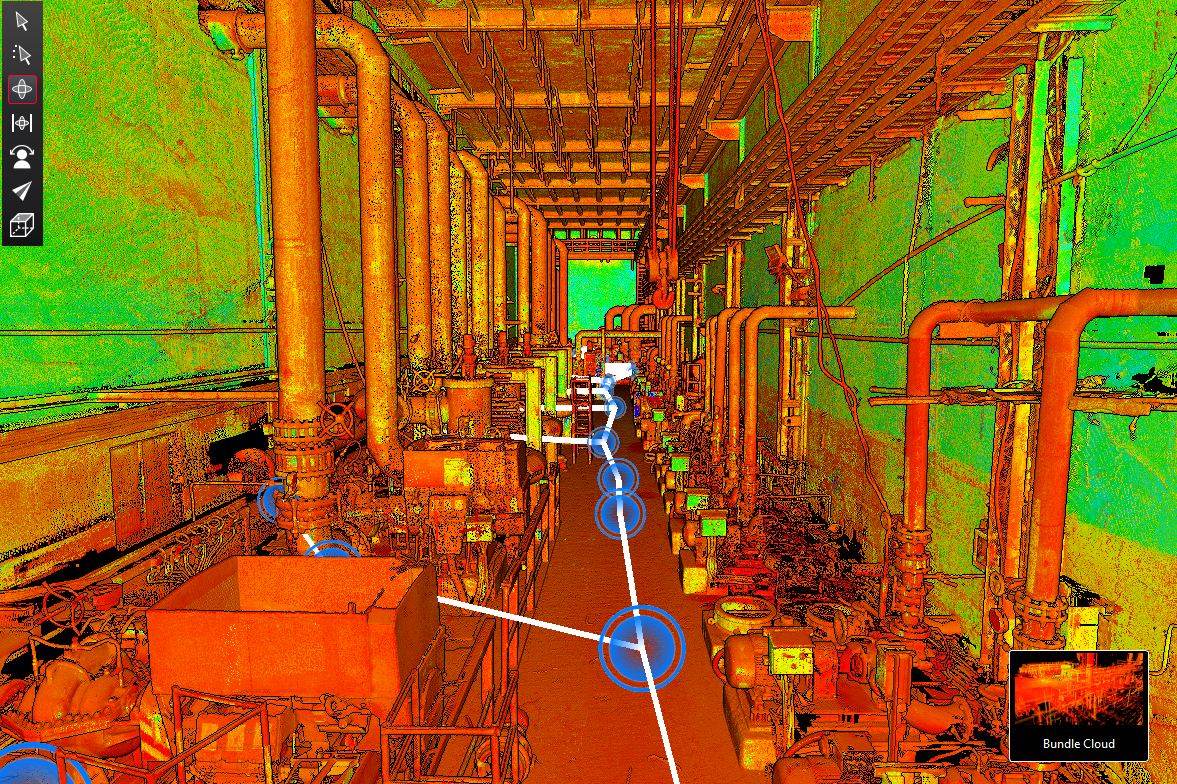 The point cloud
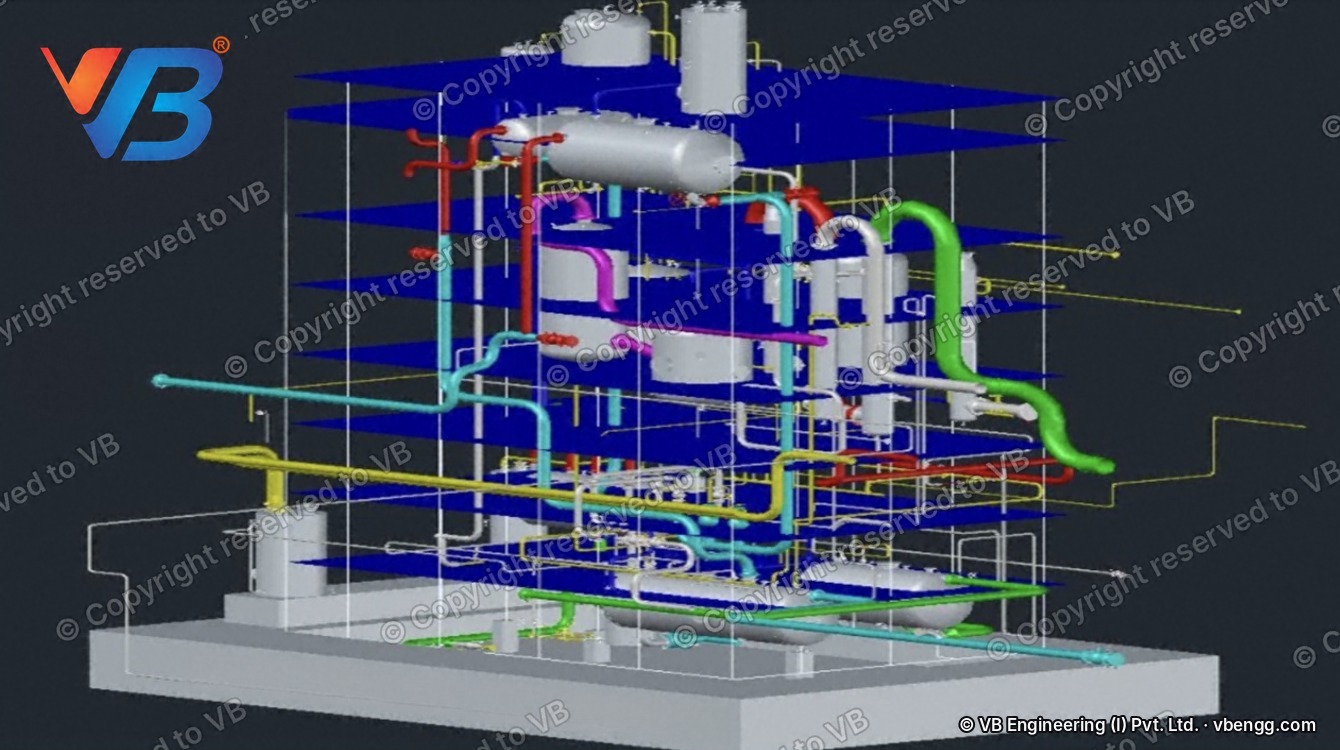 The model
Who checks the model against your LOA?
Three named roles, so accountability for accuracy is visible.
BIM lead
Models each zone to the agreed LOD in your template and naming.QA engineer
Runs the cloud-to-model deviation analysis against the LOA and signs the heat map.Named project manager
One point of contact and a weekly progress update. US team in Katy, Texas.Illustrative example: a mid-size automotive components plant in the US Midwest
A modeled example, not a client job. About 150,000 sq ft, scanned for a line change and a simulation study. Setting the levels by zone put the modeling effort where the decisions are made, and left the rest at the level the use needs.
| Zone | LOD and LOA set |
|---|---|
| Racking, dispatch and roof | LOD 200 · LOA20 |
| Production floor and equipment | Building at LOD 300 · equipment at LOD 200 with simulation data · LOA20 |
| Utility corridor and new-line tie-in | LOD 350 · LOA30 at connections |
LOD and LOA: the questions scope writers ask
What is LOD 350 in BIM?
LOD 350 is the BIMForum level at which an element’s size, shape, location, orientation and interfaces with adjacent elements can be measured from the model. In practice it adds supports, hangers, connections and clearances to LOD 300, which is what clash detection and tie-in design depend on.
What is LOD 300, and how is it different from LOD 350?
LOD 300 is the level at which the element itself is measurable: its size, shape, location and orientation can be taken from the model. At LOD 350 the way it meets other elements is measurable too: connections, supports, sleeves and clearance zones. Choose LOD 350 where trades interface or new work connects to existing.
Is LOD 500 more detailed than LOD 400?
No. In the 2025 BIMForum specification, LOD 500 describes where the geometry comes from (an existing or as-constructed condition, with its accuracy noted), not a step beyond LOD 400. A scan to BIM scope should therefore state LOD and LOA instead.
What is the difference between LOD and LOA?
LOD is how complete and reliable an element is; LOA is how closely its position matches reality, stated as a tolerance met at 95% confidence. They are specified separately because a detailed element can still be in the wrong place.
What LOA can a laser scan achieve?
It depends on the scanner, the registration and the survey control, so the registration report is the evidence, not a brochure figure. Ask your scanning team which LOA the registered cloud supports before you set the model’s LOA.
Which LOD do I need for clash detection?
LOD 350 in the zones where systems meet, typically utility corridors, ceilings and tie-in areas. Open floor and racking rarely need more than LOD 200 or 300.
Which LOD and LOA do I need for a FlexSim or Plant Simulation layout?
Usually LOD 200 for the building and equipment envelopes, with origins, orientation and clearances added, at LOA20. Simulation needs the floor right, not every pipe. VB delivers this as the Scan-to-Simulation Model on its scan to BIM services page.
Can one model have different LODs in different areas?
Yes, and it should. The BIMForum specification assigns LOD to elements, not to the whole model, so a scope can set LOD and LOA by zone and by discipline.
Does a higher LOD cost more?
Yes. Modeling effort rises with each level and with the density of the area, which is why setting levels by zone controls cost. Get a price for your zones on the scan to BIM services page.
How do I check that a delivered model meets the LOA?
Run a cloud-to-model deviation analysis for each zone and compare it with the LOA you set. VB issues it as a color heat map with every delivery, so you can see where the model sits inside or outside the tolerance.
What is LOD 200 in BIM?
LOD 200 is the BIMForum level at which an element is a generic placeholder with approximate size, shape, location and orientation. In scan to BIM it suits open floor, racking, roofs and simulation base layouts, where positions matter more than detail.
What is LOD 400 in BIM?
LOD 400 is the BIMForum level at which an element carries enough detail for fabrication, assembly and installation. In scan to BIM, use it only for spools, supports and shutdown packages that a fabricator cuts from the model, and only where the registration report shows the cloud supports the accuracy.
Question not answered here? It is usually the one worth asking.
Where to go once your levels are set
These pages answer the next questions: who models it, what it costs and how the scan gets done.
Scan to BIM services
Point cloud to Revit at LOD 200 to 400, with a deviation heat map on every model.
The inputLiDAR scanning
Laser scanning of operating plants, registered and checked for coverage.
Drawings too3D plant modeling and CAD
Plant models and drawings for revamps and engineering packages.
Steel plantsSteel plant 3D models
Blast furnace, melt shop, rolling mill and utilities, modeled zone by zone.
Automotive and EVAs-built factory models
Measured layouts for line changes, automation and simulation.
Send us your zones and uses
Tell us what the model is for and how the site splits. An engineer returns the LOD and LOA table for your scope, checked against what your cloud supports, with a price.
- LOD and LOA set zone by zone and discipline by discipline
- Checked against your registration report, not a brochure figure
- A price for the model, delivered in your template
Get your scope reviewed
- Reviewed by a BIM lead, not a sales desk
- Levels checked against what your cloud supports
- Scope and price in writing
Prefer to write? connect@groupvb.com · or WhatsApp us from the chat button